

If you’re exploring AI‑powered video generation, chances are you’ve heard of Pika Labs. But before diving in, understanding “pika labs pricing” clearly can help you pick the right plan for your needs whether you're casually experimenting or producing content regularly. In this article, we’ll walk you through current Pika Labs plans, credit usage, who should choose which tier, and how to get the most out of your investment.
Using simple language, this guide ensures you know exactly what you’re paying for and helps you avoid surprises.
What is Pika Labs?
Pika Labs is a tool that lets users generate, edit, and export short AI-generated videos using text-to-video or image-to-video workflows. Its design supports creators of varying skill levels, from hobbyists to professionals, through a credit-based generation model that directly ties into how Pika Labs pricing is structured.
 Instead of paying per video, users subscribe to a plan that grants a certain number of monthly “credits.” Each video generation or edit consumes credits based on duration, resolution, and effects used which is a core factor in how Pika Labs pricing translates into cost-per-creation.
Because of this credit system, the cost per video can vary, giving you flexibility over your expenses based on how much you create under the current Pika Labs pricing plans.
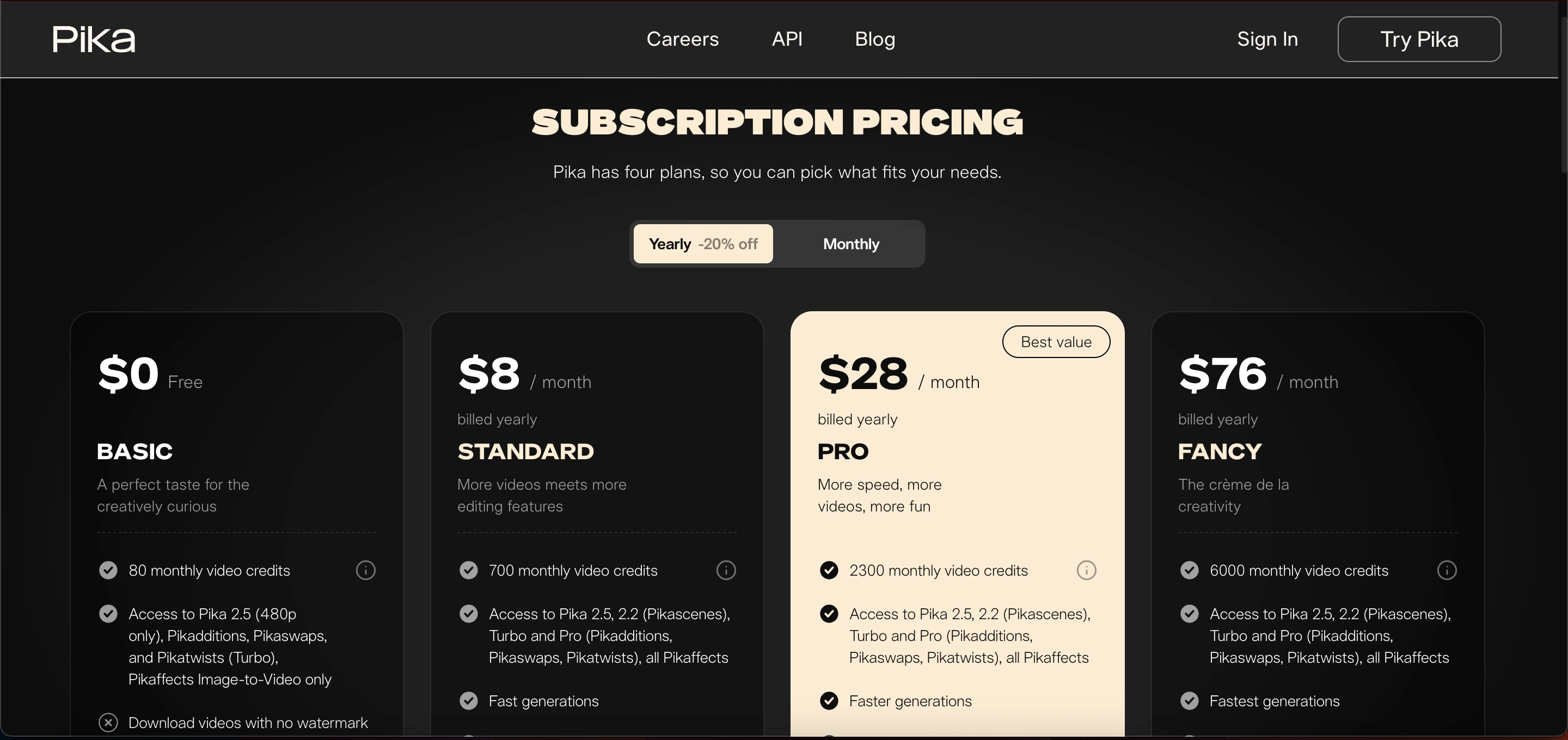
Pika Labs Pricing Plans (2025)
Here’s a breakdown of the main plans offered by Pika Labs at present.
Plan | Price (monthly) | Monthly Credits | What You Get |
|---|---|---|---|
Free (Basic / Starter) | $0 | 80 credits/month | Access to basic tools text-to-video or image-to-video with 480p output, basic effects (like Turbo, Pikadditions, Pikaswaps, Pikatwists), but limited to low resolution & credits. Watermark on videos. |
Standard | $8 / month (billed yearly) | 700 credits/month | Access to more models (including 2.2, Turbo, Pro), faster generation, watermark-free downloads, HD output options, and commercial use rights. |
Pro | $28 / month (billed yearly) | 2,300 credits/month | All models + effects, quicker generation, watermark‑free, commercial rights, good for frequent creators or small teams. |
Fancy | $76 / month (billed yearly) | 6,000 credits/month | For heavy use or studios: highest credits, top speed, full feature access, HD export, no watermark, commercial rights. |
On Credit Usage
Each video generation or effect consumes credits. The number of credits depends on resolution, video length, and the model/effects used (basic vs advanced).
For example: simple short clips at lower quality may consume few credits, while longer HD clips with effects will use more.
Because of this, actual “cost per video” is flexible your effective cost depends on how much you create and with what quality.
Read Also: Remove ZMO AI: Features & Best Tools
Free vs Paid
When Free (Basic) Makes Sense
You are just experimenting or testing the tool.
You only need occasional short clips, perhaps for personal use or small projects.
You don’t mind lower resolution or watermarked video.
Free plan gives a taste of what Pika Labs can do, without any costa good for learning the interface or trying simple experiments.
When Standard is a Good Value
You create videos moderately often maybe social-media clips, short promos, or small projects and want a plan that aligns well with Pika Labs pricing.
You want watermark‑free outputs, better quality, and commercial‑use rights without paying too much.
You want to explore more features than basic, but don’t need high volume.
With 700 credits/month and full feature access, the Standard plan often hits the balance between price and utility, making it one of the most practical choices within Pika Labs pricing tiers.
For Frequent Creators: Pro Plan
You produce multiple videos per month for example, frequent content creation, series, client work, or educational content.
You value faster generation, larger credit allowance, and consistent access to all models and features.
Budget‑conscious but need decent volume without splurging for top tier.
With 2,300 credits/month, Pro lets you create dozens of clips (depending on length/effects) and is a fit for serious creators or small teams.
For Studios / Heavy Use: Fancy Plan
You need maximum credits, fastest rendering, and complete access to every feature, which aligns with the premium tier of Pika Labs pricing.
You need maximum credits, fastest rendering, and complete access to every feature.
You want no limitations in volume or quality.
Fancy is ideal when you expect big workloads, regular production demands, or professional-grade output.
See Also: Descript
Comparison: Pika Labs vs Other AI Video Tools
Tool / Platform | Typical Pricing / Cost Model* | Key Features & Strengths | Best For / Use Case |
|---|---|---|---|
Pika Labs | Free tier + credit‑based subscription (monthly) or pay‑per‑use depending on plan / credits | Text-to-video & image-to-video; stylized / creative video generation; fast generation; flexible credits for varying workloads; watermarked output on free, watermark‑free + commercial usage on paid tiers. | Hobbyists, social‑media creators, small teams producing stylized short videos; anyone who wants flexibility and moderate budget |
Runway ML | Subscription (several tiers) e.g. Standard ~$15/month, higher depending on plan. | Full editing and generation features (text-to-video, image-to-video, video editing, advanced tools, high‑resolution output, editing suite) | Creators needing a more complete video creation/editing suite; those working on cinematic, editorial, or polished content with higher production needs |
Synthesia | Starts around ~$30/month (entry-level) | AI avatars and voice‑over, support for multiple languages, good for explainer videos, corporate use, training & presentations. | Businesses, educators, companies making training, corporate presentations, or explainer videos where human‑like avatars and voiceovers matter more than stylized or cinematic animation |
Lumen5 (and similar marketing‑video tools) | Starts ~$19–$29/month depending on tier | Easy drag‑and‑drop, template-based video creation, stock media, suited to converting blog posts / scripts / marketing copy into video format minimal editing or AI‑animation complexity. | Content marketers, bloggers, social media marketers who want quick, templated videos for marketing, ads, or simple social posts without complex animation needs |
What Does “Credit-based” Actually Mean
Unlike tools that charge per video or per minute, Pika Labs uses a credit-based system. That means:
You pay once per month (subscription), then consume credits as you create.
Each generation or effect deducts credits depending on resolution, duration, and complexity.
Simple clips may cost just a few credits; advanced HD videos with effects can consume dozens or more credits.
This gives flexibility: you can create many small videos or fewer high-quality ones based on your plan.
Because credit usage can vary so much, for frequent creators it's important to monitor consumption and plan accordingly.
Pros and Cons of Pika Labs Pricing
Feature | Pika Labs | Notes / Details |
|---|---|---|
Pros | Flexible & scalable | Whether you’re testing ideas or producing regularly, there’s a plan that fits. |
Affordable entry | Free plan or low-cost Standard can serve beginners or small creators. | |
Credit-based freedom | You don’t pay per video credits let you manage volume and quality. | |
Commercial rights & watermark-free outputs | Paid plans provide usable videos for commercial purposes without watermark. | |
Cons / Things to Watch Out For | Credits can run out fast | Especially if you create longer or multiple high-res videos heavy use may require a higher plan. |
No rollover by default | Unused credits may expire depending on plan, so plan usage carefully. | |
Quality vs cost trade-off | High-quality, long, or effect-heavy videos consume more credits. | |
Paid plans may feel expensive for casual users | If you produce very little, monthly payments may not seem worth it. |
Tips to Get the Most from Pika Labs Pricing
Start with Free / Standard: Test features, see what credits typical video uses, and evaluate your needs before upgrading.
Plan your projects: Group multiple videos in a month and batch generate helps use credits efficiently.
Monitor credit usage: Keep track of credits per video (duration, resolution, effects) to avoid waste.
Match plan to workload: If you create few short videos Standard may suffice. If you produce many, go Pro or Fancy.
Downgrade or upgrade as needed: Because Pika Labs uses subscription tiers, you can adjust based on monthly demand.
Summary
Understanding Pika Labs pricing is essential for making informed decisions before using the platform. Their credit-based subscription model offers flexibility for creators of all levels from casual hobbyists to professional studios.
The Free plan allows beginners to test and experiment without commitment, while the Standard plan provides good value for moderate creators.
The Pro plan is ideal for regular producers who need higher credit limits, and the Fancy plan supports heavy-duty or studio-level video production. Since each video consumes credits, your actual cost per video depends on how you manage your usage.
By carefully planning and selecting the appropriate tier based on your needs, you can maximize the benefits of Pika Labs pricing and make it a cost-effective solution for AI-generated video content.
Frequently Asked Questions (FAQs)
What is Pika Labs and how does it work?
Pika Labs is an AI‑powered video‑generation tool. You can give it a text prompt or upload images/video, then it generates a video based on that. You don’t need traditional editing skills the AI handles rendering, motion, effects, and output.
Is there a free version of Pika Labs?
Yes. Pika Labs offers a free plan (often called “Free” or “Basic”) that gives you a limited number of monthly credits. This lets you test the platform and try basic features before committing to a paid plan.
What do “credits” mean and how does the credit system work?
Instead of paying per video, Pika uses a credit‑based subscription model. Each video generation or effect consumes a certain number of credits cost varies depending on the video’s length, resolution, and the model or effect used.
If I don’t use all my credits one month do they roll over?
In many cases, unused monthly credits do not roll over automatically to the next month.
What plans does Pika Labs offer (free and paid)?
Pika Labs has multiple tiers: a free‑tier with limited credits; and paid plans offering more monthly credits, faster generation, watermark‑free downloads, and commercial use rights.
Can I use videos created with Pika Labs commercially (for clients, ads, social media)?
Yes, On the paid plans, Pika Labs typically allows commercial use of generated videos.
Does the cost per video stay the same?
No, Because Pika uses credits and different generation settings (resolution, length, effects) consume different amounts of credits, the “cost per video” depends on how you use the credits.