

professionally, you may already be looking for the final cut pro student discount. Apple makes this possible through a special offer called the Pro Apps Bundle for Education, which gives access to Final Cut Pro along with other premium creative apps at a much lower price.
This guide explains everything you need to know from eligibility, pricing, and features to step-by-step instructions for getting the discount. The goal is to give you clear, honest, and updated information so you can confidently decide whether this discount is right for you.
What Is the Final Cut Pro Student Discount?
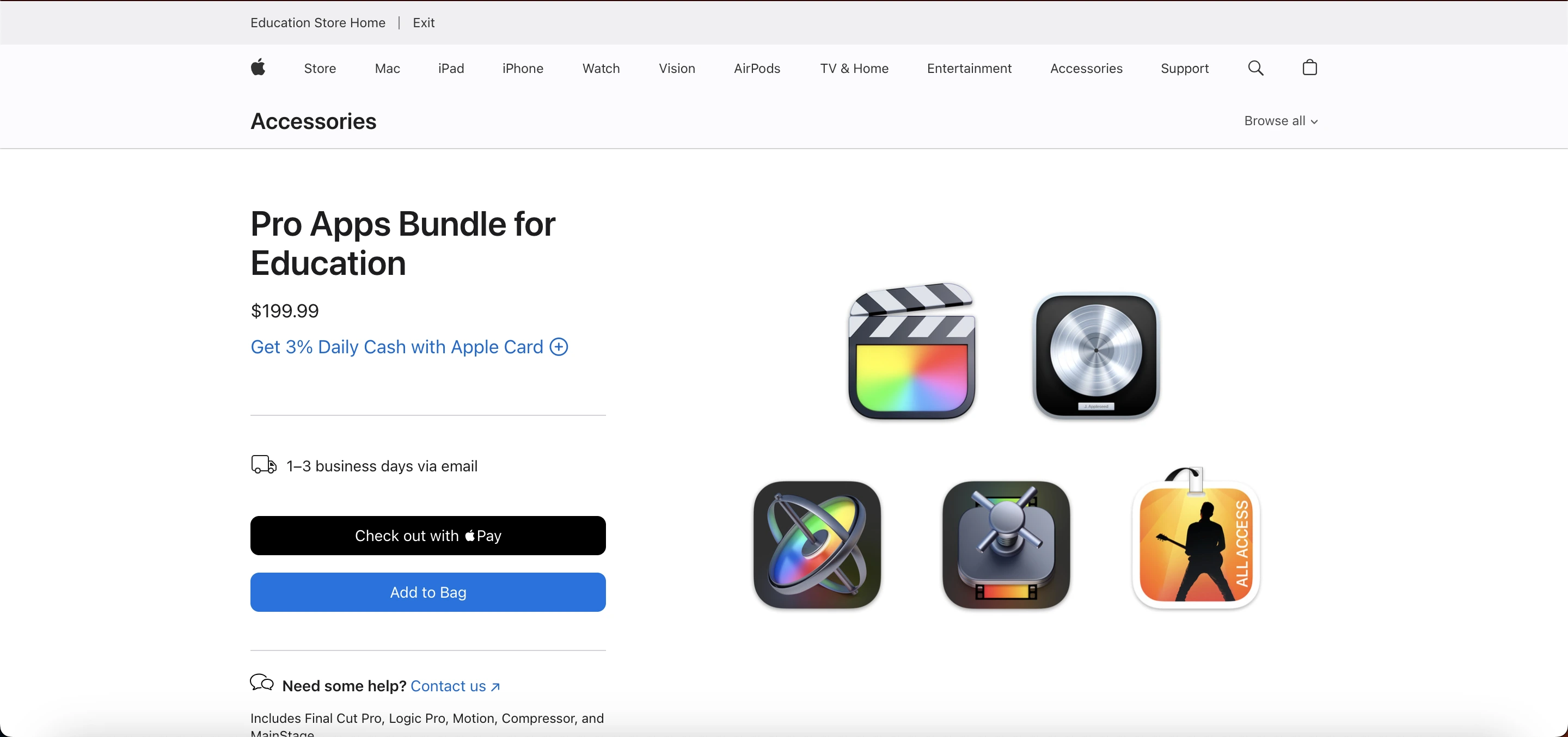
Apple does not offer a standalone reduced price for Final Cut Pro. Instead, the company provides the Pro Apps Bundle for Education, which includes:
Final Cut Pro
Logic Pro
Motion
Compressor
MainStage
This bundle is specifically designed for students, teachers, and educational institutions. The main highlight for many buyers is Final Cut Pro, which alone normally costs $299.99. With the final cut pro student discount, you get all five apps together for a significantly lower price, making it a valuable deal for anyone learning video or audio production.
Why Apple Offers a Student Discount
Apple provides the final cut pro student discount to support learning in creative fields such as film, editing, audio engineering, and multimedia production. Many schools and universities teach video editing on Apple devices, and this discount helps students gain access to professional tools without spending a large amount upfront.
 What’s Included in the Pro Apps Bundle
Here’s a breakdown of everything you get through the final cut pro student discount:
1. Final Cut Pro
A powerful video editing software for Mac known for:
Magnetic Timeline
Advanced color grading
Multicam editing
High-quality exports
Smooth performance on Apple Silicon
2. Logic Pro
A full audio production studio used by music creators and sound engineers. It supports recording, mixing, mastering, plugins, and large audio projects.
3. Motion
A motion graphics tool to create titles, transitions, 2D/3D animations, and effects that work seamlessly with Final Cut Pro.
4. Compressor
A tool for customizing video export settings, converting formats, and preparing videos for platforms like YouTube.
5. MainStage
A performance tool for musicians that works with Logic Pro’s instruments and sounds.
Buying all of these separately would cost far more than the bundle. That’s why many students prefer the final cut pro student discount even if they mainly need Final Cut Pro.
How Long Does the Buying Process Take?
Most buyers complete the purchase in minutes. Verification may take longer depending on the proof submitted. Once verified, Apple sends download codes instantly, allowing you to install Final Cut Pro and the other apps right away.
Why Students Prefer the Final Cut Pro Student Discount
There are several reasons why this discount remains popular:
Huge Savings
The bundle costs almost the same as Final Cut Pro alone, but includes four additional apps.
One-Time Purchase
No subscription fees pay once and keep the apps.
Perfect for Creative Courses
Students studying media, filmmaking, photography, music, or digital arts get tools used by professionals.
Future-Proof Skills
Learning Final Cut Pro helps prepare students for internships and career opportunities.
Works on Apple Silicon
The apps run smoothly on the newest Mac devices.
Buying the Pro Apps Bundle is often the smart choice because the final cut pro student discount gives long-term value for a single payment.
Pros and Cons
Pros | Cons |
|---|---|
Huge savings compared to buying apps individually | Only available to eligible students and teachers |
One-time payment, no subscription | Mac required does not work on Windows |
Includes five professional apps | Verification required in some regions |
lifetime access to apps | Bundle cannot be customized |
Ideal for learning filmmaking, audio, and motion graphics | Price varies by country |
Eligibility for the Final Cut Pro Student Discount
Apple has clearly defined rules about who can access this discount. You must fall into one of these categories:
1. Students
You qualify if you are:
Currently enrolled in college or university
Accepted into an upcoming degree program
A student studying at an accredited higher education institution
High school students may not qualify unless Apple changes its rules locally.
2. Teachers
The discount is available to:
Current teachers
Faculty members
Staff at educational institutions
Homeschool teachers (in some regions)
3. Educational Institutions
Schools and universities buying apps for student labs also qualify.
Apple may ask for verification depending on your region.
Read Also: CapCut Sign Up Guide
Full Price vs Student Discount
App Name | Regular Price | Included in Student Bundle? |
|---|---|---|
Final Cut Pro | $299.99 | Yes |
Logic Pro | $199.99 | Yes |
Motion | $49.99 | Yes |
Compressor | $49.99 | Yes |
MainStage | $29.99 | Yes |
Total Value | $629.95 | Included for a much lower bundle price |
How to Get the Final Cut Pro Student Discount (Step-by-Step)
Follow these steps to buy the bundle:
Step 1: Visit Apple’s Education Store
Go to the official Apple Education Store for your region.
Step 2: Look for the Pro Apps Bundle for Education
The bundle is listed under the Apps section.
Step 3: Add to Cart
Click “Buy” to add the bundle to your shopping cart.
Step 4: Verify Your Student Status
In many countries, Apple uses UNiDAYS or asks for an official student document.
You may need:
University student ID
Acceptance letter
Teacher employment proof
Step 5: Complete the Payment
After verification, complete the purchase.
Step 6: Download Your Apps
Once you receive the email, you can download Final Cut Pro, Logic Pro, Motion, Compressor, and MainStage using the App Store.
After installation, you can enjoy all features without restrictions.
The buying process is simple, and most students get the final cut pro student discount within minutes.
Final Cut Pro Student Discount vs. Full Price
Here is a simple comparison:
Feature | Pro Apps Bundle (Student Discount) | Full Price Final Cut Pro |
|---|---|---|
Final Cut Pro | Included | Included |
Logic Pro | Included | Not included |
Motion | Included | Not included |
Compressor | Included | Not included |
MainStage | Included | Not included |
Price | Much lower | Higher |
Eligibility | Students & teachers | Everyone |
Benefits of Using Final Cut Pro as a Student
Using Final Cut Pro through the final cut pro student discount gives several advantages:
1. Learn Industry Skills
Many content creators, filmmakers, and editors use Final Cut Pro professionally.
2. Fast Rendering and Smooth Editing
Final Cut Pro is optimized for Mac hardware, which means less waiting and more editing.
3. Helpful for Assignments and Projects
Perfect for media assignments, presentations, portfolios, or YouTube projects.
4. Lifetime Access Without Subscription
Many competing apps require monthly payments. Final Cut Pro is a one-time purchase.
5. Easy to Learn
The interface is user-friendly, especially for beginners.
These benefits make the final cut pro student discount a valuable opportunity for anyone studying creative subjects.
What You Can Do With the Pro Apps Bundle
The final cut pro student discount gives students access to tools that cover almost every part of media creation. This helps with class projects, assignments, and personal creative work.
1. Video Editing with Final Cut Pro
Perfect for short films, YouTube content, interviews, vlogs, and academic presentations.
2. Music Production with Logic Pro
Useful for music students, podcasters, and anyone who wants to record or edit audio.
3. Motion Graphics with Motion
Create titles, intros, transitions, animations, and effects that blend well with Final Cut Pro.
4. Professional Exporting with Compressor
Customize video formats for uploads, screenings, and assignments.
5. Live Performances with MainStage
Helpful for musicians performing or practicing with digital instruments.
Final Thoughts
The final cut pro student discount through Apple’s Pro Apps Bundle is one of the best deals available for students and educators in creative fields. You get powerful video and audio editing tools at a much lower price, all through a one-time payment.
Whether you are learning filmmaking, planning a creative career, or simply want premium apps at an affordable price, this bundle is a smart investment.
If you are eligible, this is one of the easiest ways to access professional-grade Apple software without paying the full cost. The final cut pro student discount makes it possible to learn, create, and develop your skills using tools that are trusted across the industry.
Frequently Asked Questions(FAQs)
Does Apple offer a Final Cut Pro student discount?
Yes, but it is available only through the Pro Apps Bundle for Education. Apple does not offer a separate discount for Final Cut Pro alone.
What apps are included in the Pro Apps Bundle?
The bundle includes Final Cut Pro, Logic Pro, Motion, Compressor, and MainStage.
Who is eligible for the discount?
College and university students, teachers, faculty members, and educational institutions can apply. Verification may be required based on the region.
Do I keep Final Cut Pro after I graduate?
Yes. Once purchased, the apps remain yours permanently.
How do I verify my student status?
Apple typically uses UNiDAYS or asks for valid proof such as a student ID or acceptance letter, depending on your country.
Is the Pro Apps Bundle available worldwide?
It is available in most regions with Apple’s educational pricing, but availability and rules may vary. Always check your local Apple Education Store.